Jul
23
2012
A lot has changed since I last listed my top WordPress plugins. Over the years I’ve been blogging and helping others set up their blogs, I’ve settled on the few must have WordPress plugins that are essential for any new blog.
Jetpack by WordPress
The company behind WordPress, Automattic, have compiled a collection of useful tools that is realized as the Jatpack by WordPress plugin. It’s really a plugin suite. Jetpack includes WordPress statistics right in your dashboard, social sharing widgets, WP.me short/tiny links, and other useful tools. In addition to all these features, Automattic is constantly added more add-ons and tools for this plugin.
Google Analytics
Even though it’s not been updated in a while, I still use Google Analytics so that I can track my sites’ visitors on Google Analytics. Even though the Jetpack by WordPress offers analytics, I’ve find Google Analytics to be more detailed in how it tracks visitors.
Google Sitemap Generator
Any plugin that helps search engines crawl your blog belongs in your toolbox. The Google Sitemap Generator does just that. This plugin creates a search engine friendly site map pointing out the most recent content on your site.
Yet Another Related Posts Plugin
I’ve been using Yet Another Related Posts Plugin for years. I can’t even begin to describe how this plugin works, simple put it magically detects similar blog posts on your site and creates additional links to them in the footer section of your post. This is a great plugin that helps your readers discover other similar posts on your site.
WPtouch
Now that more and more of your visitors are coming to your site using their mobile devices, such as the iPhone or Android phones, you may want to use a plugin like WPtouch. WPtouch creates a mobile device friendly version of your site.
1 comment | tags: analytics, automattic, google, jetpack, mobile, plugin, sitemap, wordpress, wp, yarpp | posted in CMS, TechKnow, Tools
Jul
6
2012
There is nothing more that I like than to received a comment to some post I wrote years ago on how it helped someone out. Like this, I’ve come to know that small chunks of code I’ve freely made available are used in production at a variety of sites. It is my hope that the tutorials, examples, and code I write here is of help to others. Even though I like writing tutorials and code to help out my fellow developers, I’ve never answered or posted a question on StackOverflow. My technical blog is really a labor of love and I post around my busy schedule, I’ve never tried to do more than just write about the technology that I use. But even though I don’t use StackOverflow I recently found out from looking at my analytics that I receive a nice amount of visitors from the question and answer site.
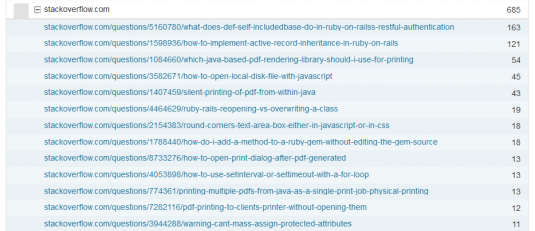
StackOverflow Stats
It always surprises me which posts are the most visited. It’s always the one that you least expect. Either way, I’m always grateful that others have found them useful enough to share on sites like StackOverflow.
no comments | tags: analytics, blog, posts, stackoverflow, statistics, top posts | posted in Programming, Social, Tools
Jan
4
2011
Google publicly announced Chrome OS in back in July 2007. They’ve been busy building a lightweight browser-powered and cloud computing-enabled Operating System. Recently in, December 2010 Google announced a test pilot program for a Chrome OS notebook dubbed Google CR-48. On the day of the announcement, some insiders already had the CR-48 in hand but Google also opened up the test pilot program to the general public via a signup form. The signup was targeted to developers, educators, and individuals alike. By way of a Christmas miracle, I was able to land a Google CR-48 and have been using it for days now.
As soon as the details of the Google Chrome Notebook were made available I was immediately in love with the Google CR-48. It’s basically an ultra light weight cloud computing client running a slimmed down web enabled Operating System. The CR-48 is as portable as an iPad but with a full keyboard. The CR-48 has a smart track pad that supports iPad-like touch gestures. The CR-48 is always on, just like an iPad or Mac Air, so there is no boot up time when all you want is just check your email or post a tweet. That said, the CR-48 is not a official product and that is evident by the simple black frame, it’s even without a trace of corporate logo or Intel inside sticker. Because the CR-48 is not a official product, I won’t say much about the industrial design and finish of the hardware other than to say that unlike the iPad, it has a USB port and a SD slot.

Google Chrome CR-48 Notebook
As soon as you open the CR-48 it turned on magically and prompted me to sign in. Unlike the iPhone or iPad, the CR-48 doesn’t require you to connect to a computer before you can use it. After some setup steps, you can sign in and take it for a run. As soon as you log into the device, you will see a Chrome browser taking up the whole screen with a single tab. It does take some time to realize that the CR-48 is a laptop with just one application, a browser. That is all it is, a browser. There is nothing to see, move along, it’s only a browser. Your desktop is your default page as shown in a Chrome browser. It merits repeating, the Chrome CR-48 only has one installed application, a Chrome browser.
As soon as you log into the CR-48 you find a browser in full window mode and if configured correctly with your home’s WiFi, you can start surfing the net. I’ve been using the CR-48 for reading blogs, checking email, liking status updates on Facebook, and accessing the web applications I use on a daily basis. Google does have a Chrome specific Web Store where you can install free and paid applications but I’ve not found anything of interest.
Aside from the technical specification of the Google Chrome CR-48 notebook, what is more interesting for me is that this is the first cloud computing client, a sort of Web 2.0 Thin Client. I am a avid user of Google Docs, GMail, WordPress, and other online services that have a large amount of my data in their respective ‘cloud.’
Realizing that this is a cloud client, privacy issues and data mining concerns immediately become apparent. It is already known that Google saves user searches and that with this and other identifying data they modify search results. It is already known that Google Adsense ads are targeted to the sites you visit. Can you imagine how valuable your browser history and usage statistics is to a company like Google? Google has a large amount of identifying information with from all angles of your browsing experience, from Google Search, Google Adsense, Google Analytics, and now Chrome and it’s Chrome notebook. I can see a future where Google would be giving away Chrome and Android-based devises for free because they can collect so much valuable information and up sell users with highly targeted ads.
The CR-48 is a great little notebook but a machine like that would never replace my laptop. At this time and with it’s current specifications, it can’t handle the hundreds of pictures I am known to take over a weekend, it can’t handle the gigabytes of video I take on a trip, and as great as Google Docs is it’s still not Microsoft Office. I see the CR-48 as a great web surfing machine while TV surfing.
no comments | tags: analytics, chrome, client, cloud, computing, cr48, gdocs, gmail, google, ipad, iphone, notebook, privacy, webstore | posted in Gadgets, Rant, TechKnow, Tools