Feb 25 2007

Swing Application Framework

In addition to the Great Java Closure Debate, I have been attentively following along the progress being made by Hans Muller with JSR 296, the proposed Swing Application Framework. In a recent interview in Artima, Hans stated that, “If we’re successful, more high quality Swing applications will be built by developers with less experience and less frustration that ever before.”

In the current state of Java desktop development, if you want to develop an application you can do so from scratch or use a Rich Client Application framework such as NetBeans Platform, Eclipse RCP, or Spring RCP. Developing a desktop client from scratch or using one of the aforementioned frameworks requires a sharp learning curve because in addition to the business domain you need to attain a certain comfort level with Swing or some rich and broad RCP platform. The Swing Application Framework (SAF from now on but not to be confused with Single Asian Female) intends to be much narrower in focus and scope than the other platforms. The SAF also intends to lower the curve or barrier to entry in developing desktop applications in a very opinionated Rapid Application Development fashion.

In my mind, the main benefits of the SAF are it’s narrow focus, application scaffolding, consistent application life cycle, management of user preferences, application resources, and actions. Common application resources are images, fonts, and text messages. The current application life cycle events made available by the SAF are launch, startup, shutdown, and exit. For a simple application you can extend from SingleFrameApplication which hides most of the grunt work and provides a functional scaffold for you application, for example all SAF applications inherit the basic file and edit menus with the appropriate cut, copy, paste, delete, and quite actions, and status bar.

As of this writing there is a preview prototype implementation with sample application available for download from the Swing Application Framework project home.

Technorati Tags: , , , , , , , , ,


Feb 19 2007

Rails Flash Charting Plugin

Flash charts just look a lot better than what we could do with plan images. Flash is a lot more interactive and since they are vector base you can zoom in and out without image deterioration. The PHP folks have a lot of great libraries for working with Flash such as Ming, PHP/SWF Charts, and Amfphp. If you want flashy graphs, pun intended, you can do so thanks to ZiYa, an XML/SWF Charts based Ruby on Rails plugin. ZiYa can be installed from the following SVN repository.

svn://rubyforge.org/var/svn/liquidrail/plugins/ziya/trunk

You typically install a Rails plugin by executing ‘script/plugin install URL’ from the application directory where you replace URL with the one above.

Once ZiYa has been installed you need to include one line into the controller to load the required graphing capabilities. Add the following line in the controller near the top.

[source:ruby]
include Ziya
[/source]

To follow along with the code examples, create a bargraph action in the controller so that we can create a bar graph. In the bargraph action we will create a bar chart object with code similar to the following.

[source:ruby]
def bargraph
chart = Ziya::Charts::Bar.new
render :text => chart
end
[/source]

The new bar chart will contain default data so that at this point we can quickly move onto the view and see ZiYa and XML/SWF in action. You do not have to create a rhtml view for bargraph since the action will generate the necessary XML required for the chart. You can render the chart in any rhtml view by adding the following view helper code.

[source:ruby]
<%= gen_chart(“chart_id”,
url_for(:controller => ‘mycontroller’, :action => “bargraph”),
“#ffffff”,
400,
300) %>
[/source]

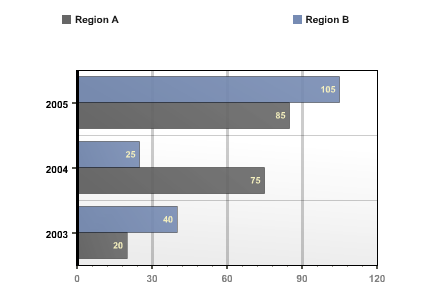
The above action and view code will generate a chart with default data that looks like the following.

ZiYa Bar Chart Example

if you want to create a similar graph with code replace the action with the following code.

[source:ruby]
def bargraph
chart = Ziya::Charts::Bar.new
chart.add(:axis_category_text, [ “2003”, “2004”, “2005”])
chart.add(:series, “Region A”, [100, 25, 40], [‘Large’, ‘Low’, ‘Soso’])
chart.add(:series, “Region A”, [80, 70, 20])
render :text => chart
end
[/source]

For this graph, the :axis_category_text symbol indicate that the following values are the y-axis labels. To produce x-axis labels you can add data for :axis_value_text. The series symbol indicates your data points. You will also notice that when setting the series data point there is an optional string array. That string array is used as legend or label for the bars in this series. The chart is highly customizable, you can create yml files that describe the theme such as color, border, and even animation effect for each charts.

The other graph types are just as easy to generate. Just as an example below is the action code required to generate a pie chart.

[source:ruby]
def piegraph
chart = Ziya::Charts::Pie.new
chart.add :axis_category_text, [“2003”, “2004”, “2005”]
chart.add :series, “Region I”, [200, 100, 50], [‘Super’, ‘Large’, ‘Medium’]
render :text => chart
end
[/source]

ZiYa is such a large and rich plugin that I obviously can’t do it justice. Please take a look at the Google Groups and official documentation.

Technorati Tags: , , , , , , , , , , , , ,


Feb 18 2007

Rails Acts As Authenticated Plugin

What is the first model you would create when developing a Ruby on Rails based web service? Mostly likely you would create a user model so as to authenticate users and grant them certain business specific privileges. Creating the required table, model, and views for a user is so common that there exists a great Rails plugin for the task. Acts as Authenticated is a plugin generator that will create your base user model and views required for a user-centric web application. Just like previous plugins, you need download and install the plugin by using the ‘script/plugin install URL’ command where you replace URL with the following.

http://svn.techno-weenie.net/projects/plugins/acts_as_authenticated

Unlike other plugins that provide additional methods to ActiveRecord models, this plugin is a generator. Run the following command to create a user model and a login controller.

script/generate authenticated user login

As mentioned, the above command will create a login controller with associated views (index, login, signup), a user model, some files under lib (authenticated_system, authenticated_test_helper), a controller helper, a controller functional test, a user unit test, a user fixture yml, and a create users migration. Wow, that is a powerful.

At this point you need to run the migration to update your database with the Acts as Authenticated users table.

rake migrate

At this point you can direct your browser to http://localhost:3000/login/signup to create a new user or http://localhost:3000/login/login to log into the system with a user and password.

The Acts as Authenticated plugin provides some functionality that allows any and all of your controllers to validate that your a user has logged in, if not they will be sent to the login page. There is also a ‘remember me’ feature that stores a cookie in the client’s browser that helps to detect that the user has previously logged in. To activate these functionality open the login controller that was created by the generator, cut the following lines and paste them in the application controller.

[source:ruby]
include AuthenticatedSystem
before_filter :login_from_cookie
[/source]

With the above two lines in your base application controller you can add the a before_filter to any other controller to ensure that your visitors first login.

[source:ruby]
before_filter :login_required
[/source]

To have access to the currently logged in user you can do so through session[:user] or current_user.

The Acts as Authenticated also provides a authenticated_mailer generator. Once activated correctly the mailer will send an email to new users with an activation URL. New users would be able to login only after they activate their account by clicking the activation URL.

Technorati Tags: , , , , , , , , , , , ,


Feb 9 2007

Introducing Yahoo! Pipes

I can best describe Yahoo!’s new service Pipes as a visual programming IDE for Web 2.0 mashups. Pipes allows you to gather, filter, truncate, analysis RSS feeds and other data sources to use that as input to other ‘modules’ all glued together with pipes. Pipes allows you to visually program web applications with prefab building blocks and connect them much as you would Lego blocks. There are other players in this space, Rapid Application Development for Web 2.0 applications, that allow you to define a custom web application such as Ning, DabbleDB, and Drapper.

I have some experience working with a drag and drop visual IDE framework. A visual IDE is usually limited to the functionality of the available building blocks. I wasn’t able to find an open API for Yahoo! Pipes that allows for the construction of new modules. I could see Yahoo! Pipes being more powerful still if there was an open API to construct additional modules.

Juixe TechKnow Pipes

I of course took Yahoo! Pipes for a little test drive. I cloned a simple pipe application and made it read the feed for this site. It was late when I was playing with pipes and I was tired, or I just lack imagination, but I couldn’t think of anything else that I wanted to do with this thing. As of this writing some of the ‘hot pipes’ are the New York Times thru Flickr, which analysis New York Times content for use as keywords to find pictures in Flickr, and TechCrunch Citations that scours a bunch of search engines for TechCrunch.

These ‘hot’ pipes are definitely interesting but you or I were could already have done that with some PHP, so what is the big deal? I think the big deal is not necessary the applications you can develop but the entry skills and time required developing them. The Yahoo! Pipes IDE/framework is what’s hot, not the applications. In todays Web 2.0 landscape, its all about the framework.

Technorati Tags: , , , , , , , , , , , , , , ,


Feb 7 2007

Rails Google Maps Plugin

I still remember the awe that struck me when I first saw for the first time Google Maps in action. I was able zoom in and out, and even circumnavigate the globe by just clicking and moving the cursor around. Google Maps really demonstrated what a web 2.0 mashup could be like. Housing Maps is mashup between Google Maps and Craigslist apartment/housing ads. If you want show all the locations of Wi-Fi hot spots in your Rails app like Hotspotr, then you need to take a look at Yellow Maps 4 Ruby on Rails Plugin for Google Maps.

Before you get started you will need to sign up for a Google Maps API access. Once you have your Maps API key install the Rails plugin by executing the ‘script/plugin install <URL>’ command from your application directory where URL is replaced with the following.

svn://rubyforge.org/var/svn/ym4r/Plugins/GM/trunk/ym4r_gm

The installation process will copy files in the under config, vendor/plugins, and in the public/javascripts directory. Open config/gmaps_api_key.yml in your favorite text editor and add your Google Maps API key under production for you domain. It was my experience that I did not have to change the Google Maps API key for the development and test environment. Now you are ready to start producing maps.

Update the HTML header of your template layout file so that some required JavaScript include statement are insert. Next to other javascript_include_tag statement add the following.

<%= GMap.header %>

In the controller you instantiate a GMap object with a id name. You will also need to supply the center of the map with the longitude and latitude and the zoom factor. If you want a little map balloon to appear you will need to create a marker. Your map can have any number of markers, each position separately with a title and info window when clicked. Here is the code used to construct a map, which can be placed in your controller.

@map = GMap.new("map_div_id")
@map.control_init(:large_map => true, :map_type => true)
@map.center_zoom_init([75.5,-42.56], 4)

marker = GMarker.new([75.6, -42.467],
  :title => "Where Am I?", :info_window => "Hello, Greenland")
@map.overlay_init(marker)

To display your map in the action’s rhtml view file you will need to lines of code. The first line will produce JavaScript code that describes your map. The second line of code will produce the div that will display the map. If any of these two lines are omitted the map will not be displayed.

<%= @map.to_html %>
<%= @map.div(:width => 600, :height => 400) %>

These are the basics of using Google Maps in your Ruby on Rails application but YM4R can do a whole lot more. Do take the time to read the Google Maps FAQ and the YM4R GM ruby docs.


Feb 7 2007

Top 11th WordPress Plugin WP-Cache

Recently, I wrote a Top 10 WordPress Plugins list. I should have made it Top 11. The additional plugin recommendation goes to WP-Cache. As you can gather from the name, WP-Cache will backup each WordPress HTML page in the file system so that the HTTP server responds faster for each page view. Basically the server/database do less work and can serve more visitors. WP-Cache is configurable via an options manager that allows you to dictate which pages to ignore and for how long to cache. This plugin is definitely helpful for the enterprise blogger.

Technorati Tags: , , , , , , , ,