Dec
13
2006
A former colleague left me a voice mail asking for help in setting up a remote debugging for a running Java process. She is now a director at a small security startup. I thought that if this was helpful for her, it might be useful for other peeps. What follows is basically the instructions I sent her via an email.
To be able to attach your Eclipse debugger to a running Java process you need to start that process with the following Java options…
-Xdebug -Xrunjdwp:transport=dt_socket,address=8001,server=y,suspend=n
Once you have done this and have restarted the server, you can use your Eclipse to attach to the running process. From Eclipse go to the Debug manager and create a new Remote Java Application configuration for the process you want to connect to. Set the port number to 8001, the same as that of the options. You will also need to enter the hostname for the machine running the Java process. That is pretty much it…
Technorati Tags: java, remote debugging, remote debug, debug, eclipse, ide
3 comments | posted in Java, Programming, TechKnow
Dec
12
2006
You can access javac programmatically, that is compile Java source code at runtime from a running program! The javac compiler is made available via the tools.jar in the lib directory from the JDK. To get started with the following example you will need to add the tools.jar to your project’s classpath. You can find tools.jar in the lib directory of your JDK installation path.
One you have tools.jar in you classpath, you can create an instance of com.sun.tools.javac.Main, the entry point for javac.
[source:java]
com.sun.tools.javac.Main javac = new com.sun.tools.javac.Main();
[/source]
You can call the compile method on the javac instance passing in an array of strings as options. For example, here are the options that include the classpath and the output directory for the file to compile.
[source:java]
String[] options = new String[] {
“-classpath”, classpath, “-d”, outputDir, filename
};
[/source]
And of course you can use any of the other options such as -deprecation or -g. To compile a source file, just invoke compile as in the following code bit.
[source:java]
javac.compile(options);
[/source]
Compile Java this way can be helpful if your application generates one off statements that need to run in the system. I have used a mechanism like this to write what essentially is a script file but in Java code instead of Groovy or Jython. One thing to remember is that tools.jar is only available with the Java Development Kit, not the Java Runtime Environment.
Technorati Tags: java, runtime, javac, scripting, script, jre, jdk, compile, groovy, jython
7 comments | posted in Java, TechKnow
Dec
11
2006
Christmas came early this year for Java developers… Java SE 6 has finally been released. Java 6 comes with a ton of Swing bug fixes, improvements, and goodies but what I am looking forward to the most is JSR 199 Java Compiler API, JSR 269 Pluggable Annotation Processing API, JSR 223 Scripting in the Java Platform, JSR 221 JDBC 4.0, and JSR 224 JAX-RPC 2.0.
NetBeans 5.5 has built-in support for Java SE 6 and you can download them together. The JDK SE 6 also comes bundled with Java DB, a pure Java SQL compliant relational database engine based on Apache Derby. The JDK also comes with jrunscript.exe, an experimental command line script interpreter. Use jrunscript to run JavaScript files or interactively code a quick and dirty prototype in your favorite scripting language. For more information regarding what is new in Java SE 6 head over to the Sun Developer Network.
Technorati Tags: java, java 6, java se, derby, apache, jdk, jre, jdbc, scripting, jsr 223, java platform, jrunscript, javascript
no comments | posted in Java, Programming, TechKnow
Dec
8
2006
Joomla! has content buckets called sections and categories. A section can contain one or more categories. Before any new content or article can be published you need to specify both the section and category for it. Just as an example, if I would maintain a Joomla! powered programming site I would define a section named programming with the following categories java, ruby, python, fun, etc.
It is incredibly easy to create a section via the Section Manager. After you have added a section you need to create a category for it. Both sections and categories can have a description and image icon associated with them.
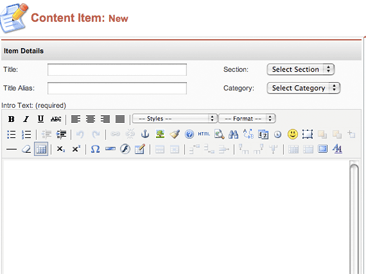
In the New Content item editor you can assign the section and category to the article to be pubished. In most Joomla! templates the article’s section and category are used to create a breadcrumb trail. Well, this only works when you add the section to the main menu! If you don’t add the section to the main menu the breadcrumb trail will default to Home | Blog | Article Title.
To add your newly created section to the main menu, drill down to the main menu (mainmenu) menu items via the Menu Manager from the Control Panel. Create a new Menu Item for mainmenu. In the New Menu Item wizard select the List – Content Section radio button and click the Next arrow. Name your menu item and select the newly created section for the menu item. Click save and you’re done. At this point your breadcrumbs will correctly display your newly created section and category.
Technorati Tags: cms, joomla, section, category, breadcrumb pattern, breadcrumb, content management, content
no comments | posted in CMS, TechKnow
Dec
7
2006
I’ve been using Joomla! for some time now for a few sites that I have set up. Joomla! comes with a great installation wizard that had a series of green, or red, lights that indicate if your server is Joomla! ready. The only real information you need before hand is the database information and the name of your Joomla! powered site.
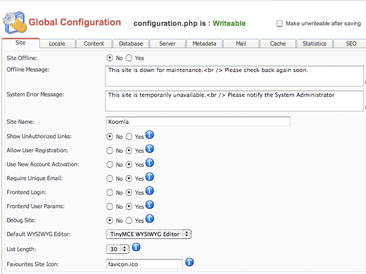
As soon as you install and configure Joomla! you should log onto the administrator’s control panel and set some global settings. What follows are some advice on the global settings I recommend you configure soon after install Joomla! This advice is based on the current stable release 1.0.11.
Continue reading
1 comment | posted in CMS, TechKnow
Dec
7
2006
I was just in a meeting bored out of my mind… I was just listing the contents of a directory over and over with ls and a few different options until I thought I could use the options to spell words! I didn’t try to come up with an all inclusive list but here are the few I came up with.
ls -ls
ls -fun
ls -car
ls -pimp
ls -grim
ls -rump
Technorati Tags: options, command, command line, ls
no comments | posted in Rant, TechKnow