Running with Shoes – Tasty Text
The Shoes toolkit has a nice rich text format support. At first sight it might seem that Shoes text support borrows a lot from HTML, for example the most commonly used text block is para. In addition to the paragraph text block, you can use banner, title, subtitle, tagline, caption, and inscription.
[source:ruby]
Shoes.app do
stack do
banner “banner”
title “title”
subtitle “subtitle”
tagline “tagline”
caption “caption”
para “paragraph”
inscription “inscritpion”
end
end
[/source]
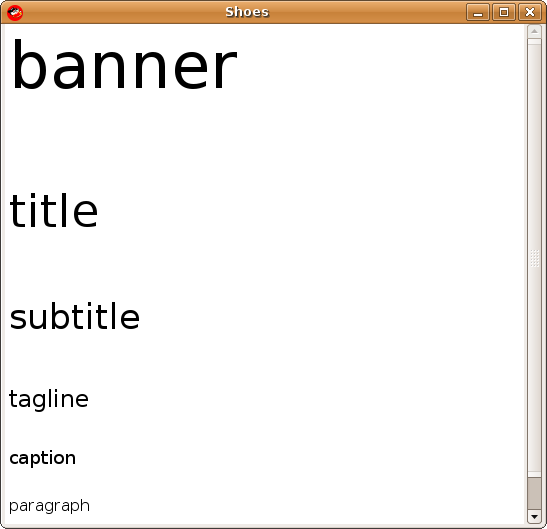
As you can see banner is the largest text block, followed by tittle, etc. The default size for banner, title, subtitle, tagline, caption, para, and inscription is 48, 34, 26, 18, 14, 12, 10 pixels respectively. You can also change the default size of a text block by using the optional size parameter.
[source:ruby]
Shoes.app do
stack do
banner “banner”, :size => 20
end
end
[/source]
Most often you will use the paragraph text block. If you have to display a great amount of text on a paragraph you pass in variable number of strings parameters.
[source:ruby]
Shoes.app do
stack do
para “Lorem ipsum dolor sit amet, “,
“consectetur adipisicing elit”
end
end
[/source]
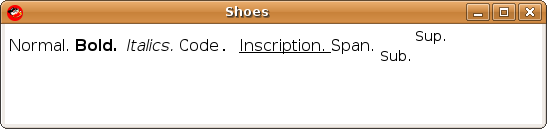
In addition to text blocks, Shoes supports text formats such as strong, em, code, ins, span, sub, and sup. Here is an example of using a paragraph block with all of the text formats.
[source:ruby]
Shoes.app do
stack do
para “Normal. “,
strong(“Bold. “),
em(“Italics. “),
code(“Code. “),
ins(“Inscription. “),
span(“Span. “),
sub(“Sub. “),
sup(“Sup. “)
end
end
[/source]
In addition to simple text blocks and text formatting methods, you can create hyper links. Just like the hyper web, links can execute some event or code.
[source:ruby]
Shoes.app do
hyper_link = link “hyper link” do
puts “link pressed”
end
stack do
para hyper_link
end
end
[/source]
The above code creates a link and assigns it to the hyper_link variable. The link is later passed on to the paragraph block for display. If you click on the link ‘link pressed’ will be printed on the terminal console.
In addition to executing custom code when a link is pressed, you can also launch the default browser if you use the click parameter. The code below displays a link and when pressed it will launch the Firefox or your default browser to the given URL.
[source:ruby]
Shoes.app do
stack do
para(link “Juixe TechKnow”, :click => “http://www.juixe.com/techknow”)
end
end
[/source]
All the text formatting methods also accept an option stroke parameter to sent the color. Here is a simple example of using color with your text.
[source:ruby]
Shoes.app do
stack do
para em(“Hello, “, :stroke => green),
strong(“World!”, :stroke => blue)
end
end
[/source]
Here is a recap of the available methods for working with text with the Shoes toolkit.
Text Blocks:
para, banner, title, subtitle, tagline, caption, inscription
text formats:
strong, em, del, ins, link, span, sub, sup
There are more Shoes GUI tutorials and code samples here.
Technorati Tags: ruby, shoes, gui, ui, toolkit, text block, text format