Joomla! Global Configuration
I’ve been using Joomla! for some time now for a few sites that I have set up. Joomla! comes with a great installation wizard that had a series of green, or red, lights that indicate if your server is Joomla! ready. The only real information you need before hand is the database information and the name of your Joomla! powered site.
As soon as you install and configure Joomla! you should log onto the administrator’s control panel and set some global settings. What follows are some advice on the global settings I recommend you configure soon after install Joomla! This advice is based on the current stable release 1.0.11.
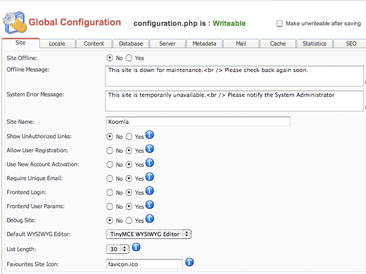
In the Site tab of the Global Configuration panel you can set the site name and user properties such as Require Unique Email and Default WYSIYG Editor. I usually just update the site name and move on to the Locale tab.
In the Locale tab set your country code and time offset.
By default an article’s title does not link to the article. You can indicate if you want titles to link to the article in the Content tab. In the Content tab you can also configure if you want to display the created and/or modified time with the article. I usually just display the created time. You can enable a rating system for you content. One of the cool integrated features of Joomla! is that anything you publish is simultaneously available in PDF form.
The last configuration setting I recommend you set immediately after installing Joomla! is in the SEO tab. Click yes to Search Engine Friendly URLs. To enable this you will need to rename the htaccess.txt in your Joomla! installation directory to .htaccess.
Technorati Tags: cms, joomla, seo, pdf, wysiwyg, content management, content